> ## Documentation Index
> Fetch the complete documentation index at: https://io.net/docs/llms.txt
> Use this file to discover all available pages before exploring further.
# Confidential Chat
> io.net provides a web-based confidential chat interface where you can interact with AI models securely, with full privacy guarantees and verifiable attestation.
## Getting Started
### Step 1: Select a Secure Model
1. Navigate to [ai.io.net/ai/models](https://ai.io.net/ai/models)
2. Look for models with the **SECURE AI** badge
3. Click on a secure model to start a confidential chat session
 ### Step 2: Start Chatting Privately
Once you select a secure model, you enter a private chat session with the following guarantees:
* **Messages are never saved** - your conversation is not stored on any server
* **No observation** - io.net staff cannot see your prompts or responses
* **Session-only context** - only the current chat is passed to the LLM for context
* **End-to-end verification** - every response is cryptographically signed
## Privacy Guarantees
| Feature | Description |
| ----------------- | ----------------------------------------------------------------- |
| Zero storage | Messages exist only in your browser and the TEE during processing |
| No logging | Conversation content is never written to logs |
| Session isolation | Each chat session is independent and ephemeral |
| Signed responses | Every AI response includes a cryptographic signature |
## Verifying Attestation and Signatures
Every message in a confidential chat can be verified. Click the **Secure AI** label under any AI response to open the verification panel.
### Step 2: Start Chatting Privately
Once you select a secure model, you enter a private chat session with the following guarantees:
* **Messages are never saved** - your conversation is not stored on any server
* **No observation** - io.net staff cannot see your prompts or responses
* **Session-only context** - only the current chat is passed to the LLM for context
* **End-to-end verification** - every response is cryptographically signed
## Privacy Guarantees
| Feature | Description |
| ----------------- | ----------------------------------------------------------------- |
| Zero storage | Messages exist only in your browser and the TEE during processing |
| No logging | Conversation content is never written to logs |
| Session isolation | Each chat session is independent and ephemeral |
| Signed responses | Every AI response includes a cryptographic signature |
## Verifying Attestation and Signatures
Every message in a confidential chat can be verified. Click the **Secure AI** label under any AI response to open the verification panel.
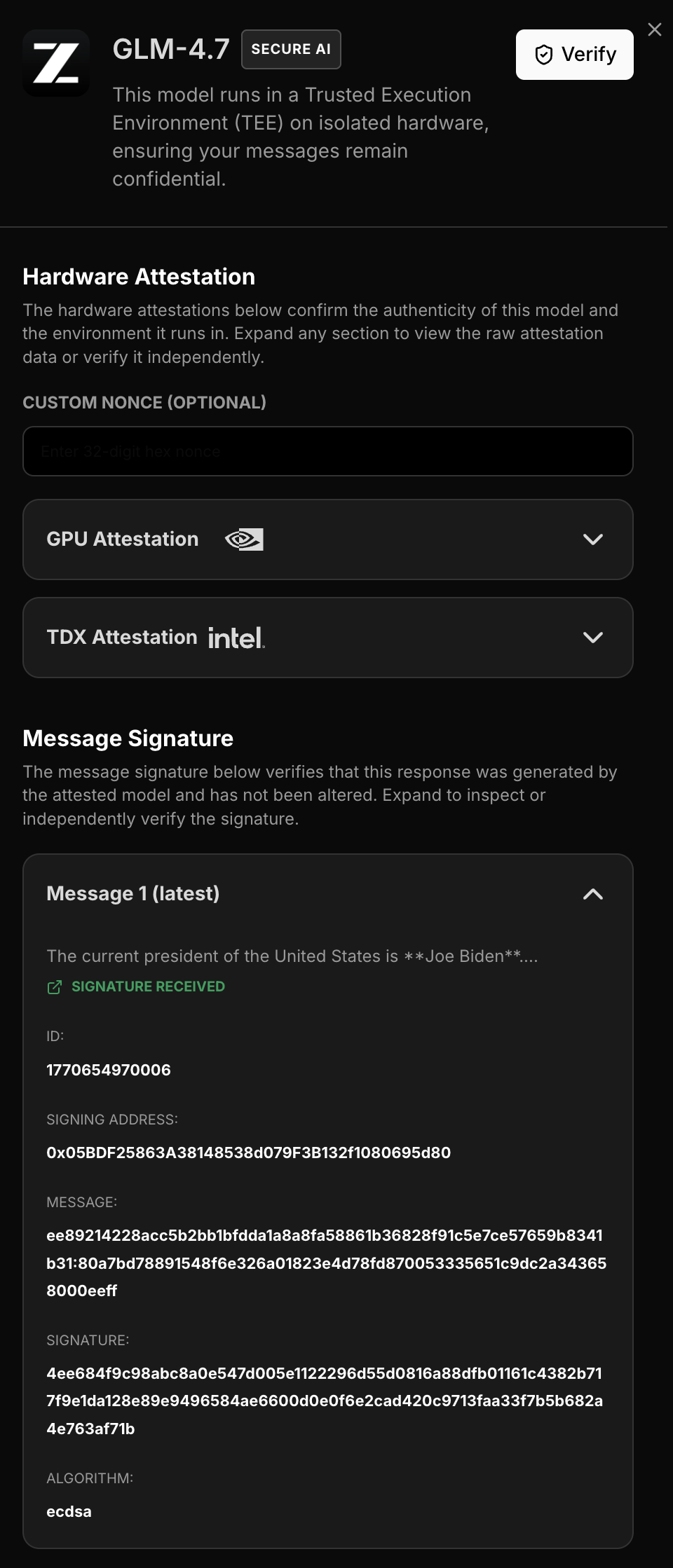 ### Attestation Report
The verification panel displays the full attestation report, proving:
* The response came from a genuine NVIDIA GPU running in TEE mode
* The specific hardware configuration and firmware version
* The container image hash (`image_digest`) running inside the secure enclave - compare with the expected digest from the [latest official release](https://github.com/ionet-official/attestation-agent/releases) to confirm the container hasn't been tampered with
### Message Signatures
For each AI response, you can view:
| Field | Description |
| ------------------- | ----------------------------------------------------- |
| **Signed Text** | The exact content that was signed |
| **Signature** | The cryptographic signature proving authenticity |
| **Signing Address** | The public key that signed (matches attestation) |
| **Algorithm** | The signing algorithm used (e.g., ecdsa) |
| **Image digest** | SHA256 hash of the container image running in the TEE |
This allows you to independently verify that:
1. The response was generated by the attested hardware
2. The content was not modified after generation
3. The signing key matches the attestation report
## Best Practices
### For Maximum Privacy
* **Start fresh sessions** for sensitive topics
* **Verify signatures** for critical responses
* **Check attestation** to confirm hardware authenticity
* **Clear your browser** after sensitive sessions
### Understanding Session Context
Since messages are not saved:
* The AI only has context from the current session
* New chat starts a new session with no history
* You cannot retrieve previous confidential conversations
This is by design - true privacy means no persistent storage.
## What's Next
* [Quick Start API](./quick-start) - For developers building integrations
* [Verification Guide](./verification-guide) - Deep dive into verifying attestation and signatures
### Attestation Report
The verification panel displays the full attestation report, proving:
* The response came from a genuine NVIDIA GPU running in TEE mode
* The specific hardware configuration and firmware version
* The container image hash (`image_digest`) running inside the secure enclave - compare with the expected digest from the [latest official release](https://github.com/ionet-official/attestation-agent/releases) to confirm the container hasn't been tampered with
### Message Signatures
For each AI response, you can view:
| Field | Description |
| ------------------- | ----------------------------------------------------- |
| **Signed Text** | The exact content that was signed |
| **Signature** | The cryptographic signature proving authenticity |
| **Signing Address** | The public key that signed (matches attestation) |
| **Algorithm** | The signing algorithm used (e.g., ecdsa) |
| **Image digest** | SHA256 hash of the container image running in the TEE |
This allows you to independently verify that:
1. The response was generated by the attested hardware
2. The content was not modified after generation
3. The signing key matches the attestation report
## Best Practices
### For Maximum Privacy
* **Start fresh sessions** for sensitive topics
* **Verify signatures** for critical responses
* **Check attestation** to confirm hardware authenticity
* **Clear your browser** after sensitive sessions
### Understanding Session Context
Since messages are not saved:
* The AI only has context from the current session
* New chat starts a new session with no history
* You cannot retrieve previous confidential conversations
This is by design - true privacy means no persistent storage.
## What's Next
* [Quick Start API](./quick-start) - For developers building integrations
* [Verification Guide](./verification-guide) - Deep dive into verifying attestation and signatures