> ## Documentation Index
> Fetch the complete documentation index at: https://io.net/docs/llms.txt
> Use this file to discover all available pages before exploring further.
# Card Payment FAQs
> This page answers common questions about using Stripe (Fiat payments) and Credits when purchasing compute or IO Credits.
This page answers common questions about using Card (Fiat) payments when purchasing compute or IO Credits.
## General Payment Logic
**Users can pay for compute in two ways:**
* **IO Credits** — internal platform credits.
* **Fiat via Stripe** — credit/debit cards payment methods.
**Minimum amounts:**
* Purchasing IO Credits — **\$1.00**
* Paying directly with Fiat — **\$0.50**
## FAQ
### Q. Can I use Fiat (Stripe) to pay for compute?
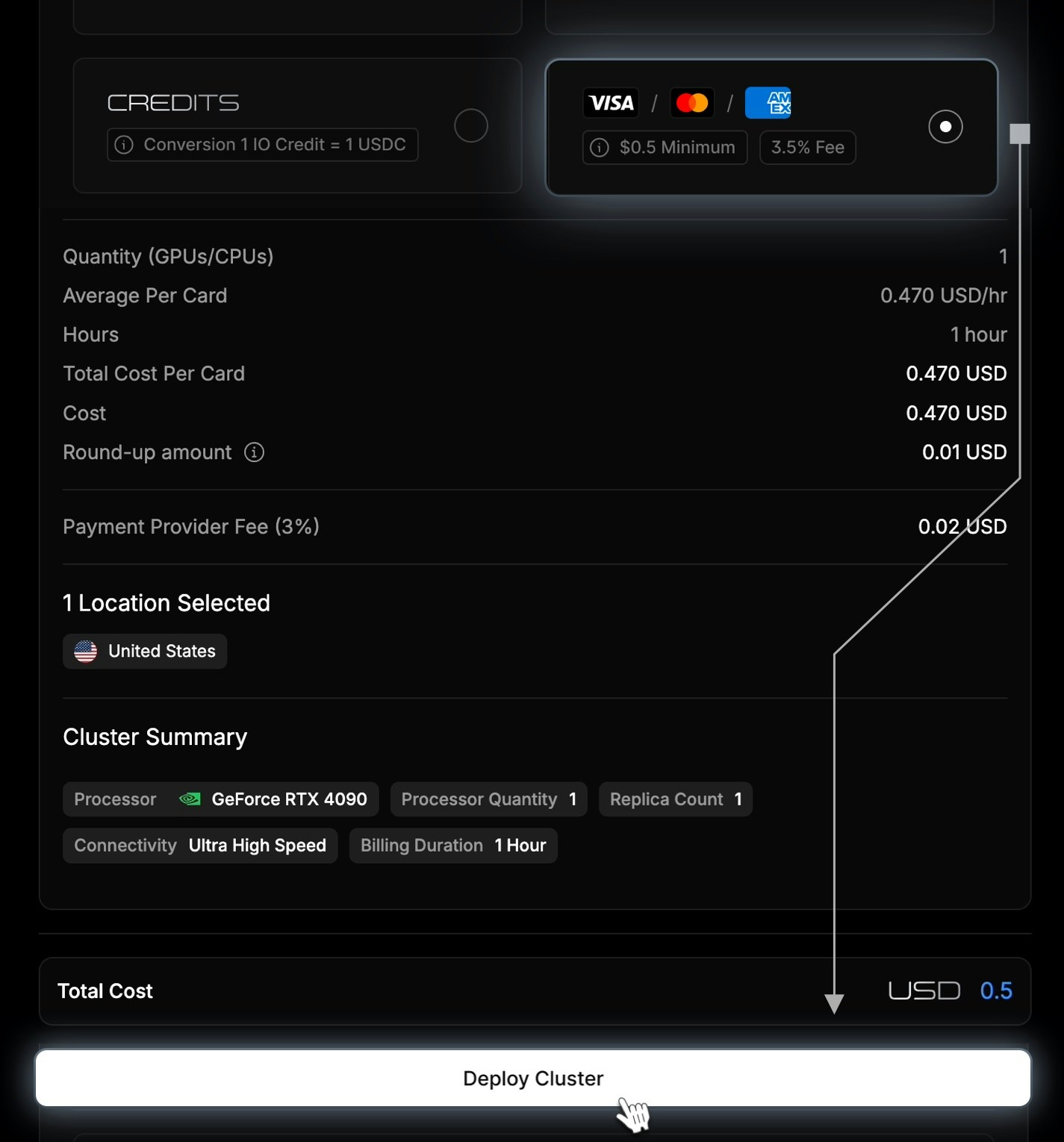
Yes. You can now pay for compute directly using Fiat through Stripe. Minimum amount: **\$0.50**
If the cluster cost is **lower than the \$0.50 minimum card payment**, Stripe will still charge \$0.50, and **the remaining balance is automatically added to your IO Credits**.
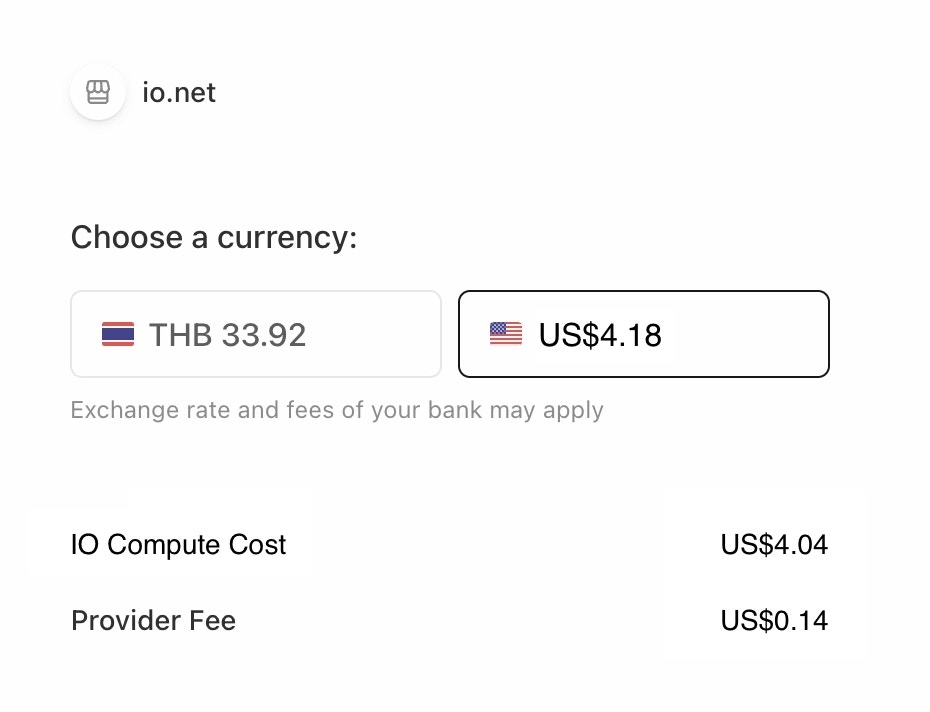
 Stripe will show line items such as:
* `Cluster Cost`
* `Payment Provider Fee`
Stripe will show line items such as:
* `Cluster Cost`
* `Payment Provider Fee`
 ### Q. Can I use Fiat to purchase IO Credits?
Yes. You can purchase IO Credits using either Crypto (USDC) or Fiat (Stripe). The minimum amount is **\$1.00**.
Stripe payment page will show line items:
* `IO Credits Cost`
* `Payment Provider Fee`
### Q. Can I use Fiat to purchase IO Credits?
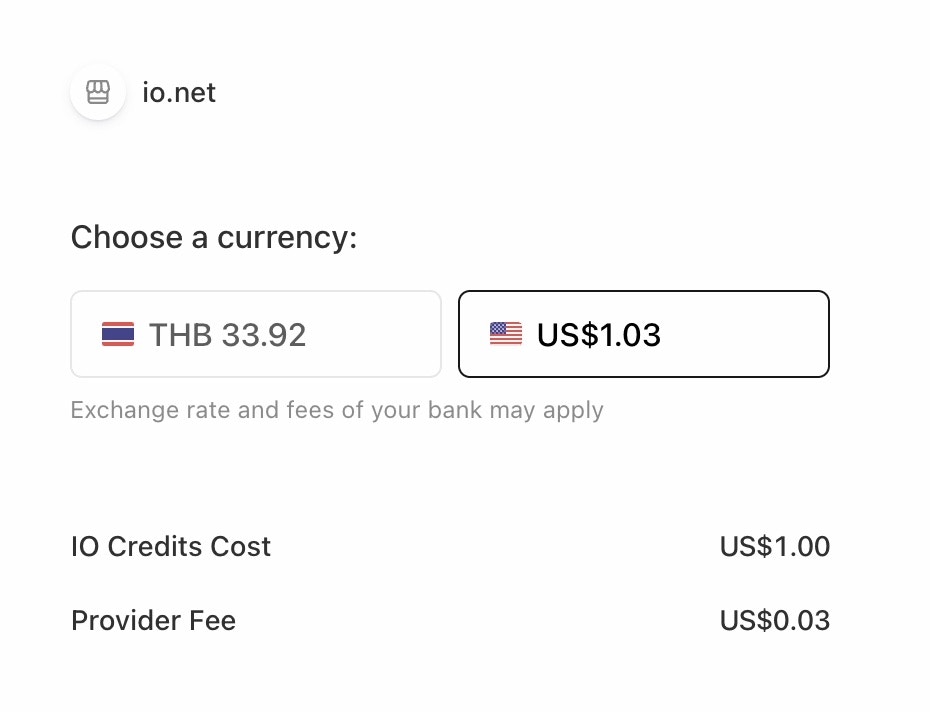
Yes. You can purchase IO Credits using either Crypto (USDC) or Fiat (Stripe). The minimum amount is **\$1.00**.
Stripe payment page will show line items:
* `IO Credits Cost`
* `Payment Provider Fee`
 After successful payment, credits are added to the user’s IO Credits balance.
### Q. What happens if I already have enough credits?
If your existing IO Credits balance is enough to cover the compute cost then **Fiat (card) payments are disabled**
The following message will appear: `You have sufficient credits to purchase compute. Please proceed to use them.` This ensures credits are used first before showing any Fiat options.
After successful payment, credits are added to the user’s IO Credits balance.
### Q. What happens if I already have enough credits?
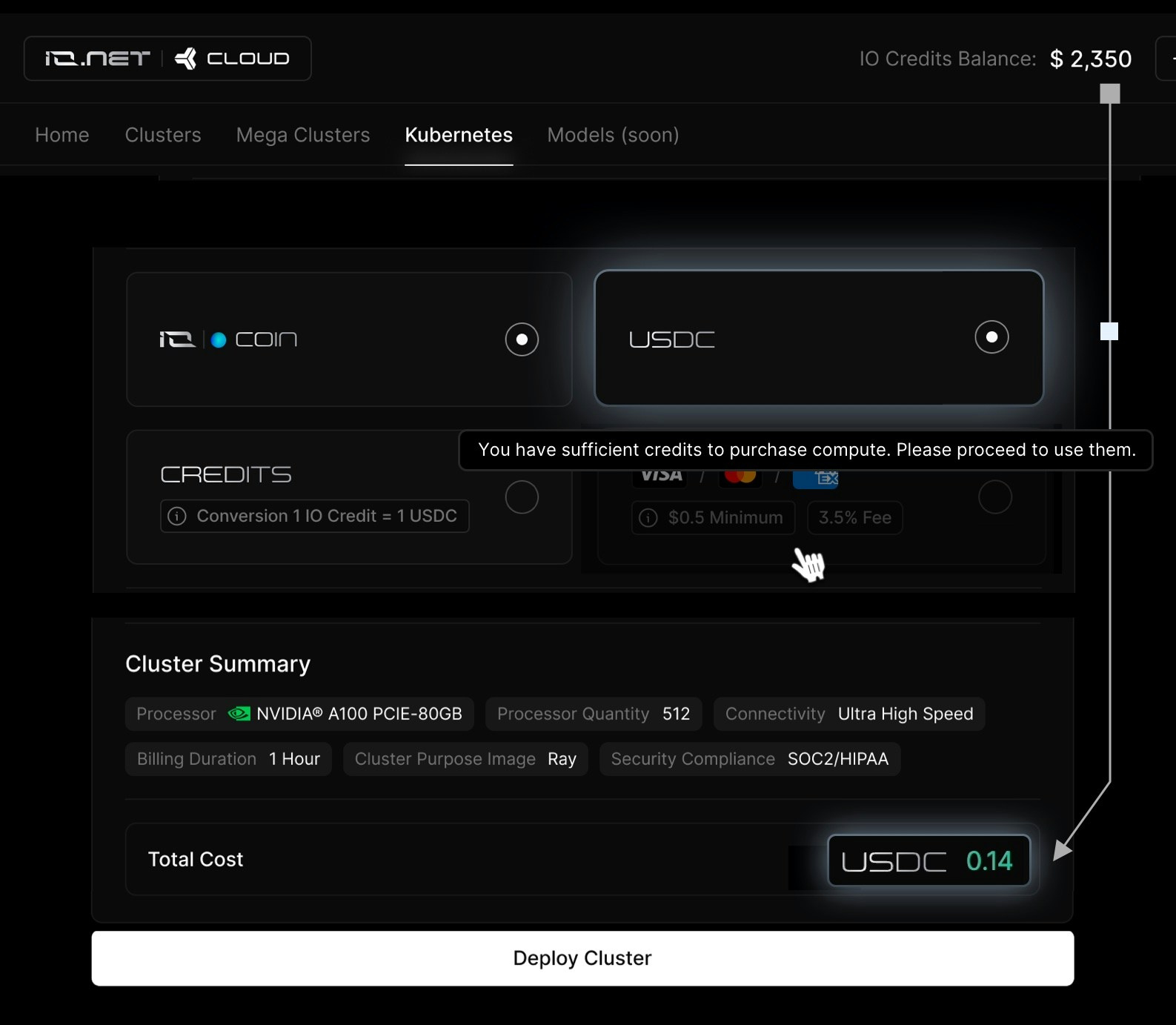
If your existing IO Credits balance is enough to cover the compute cost then **Fiat (card) payments are disabled**
The following message will appear: `You have sufficient credits to purchase compute. Please proceed to use them.` This ensures credits are used first before showing any Fiat options.
 ### Q. Can I extend my compute using Fiat?
Yes. You can extend your compute using Fiat (Stripe). It works the same as initial compute purchase. Minimum fiat amount: **\$0.50**
### Q. Can I extend my compute using Fiat?
Yes. You can extend your compute using Fiat (Stripe). It works the same as initial compute purchase. Minimum fiat amount: **\$0.50**
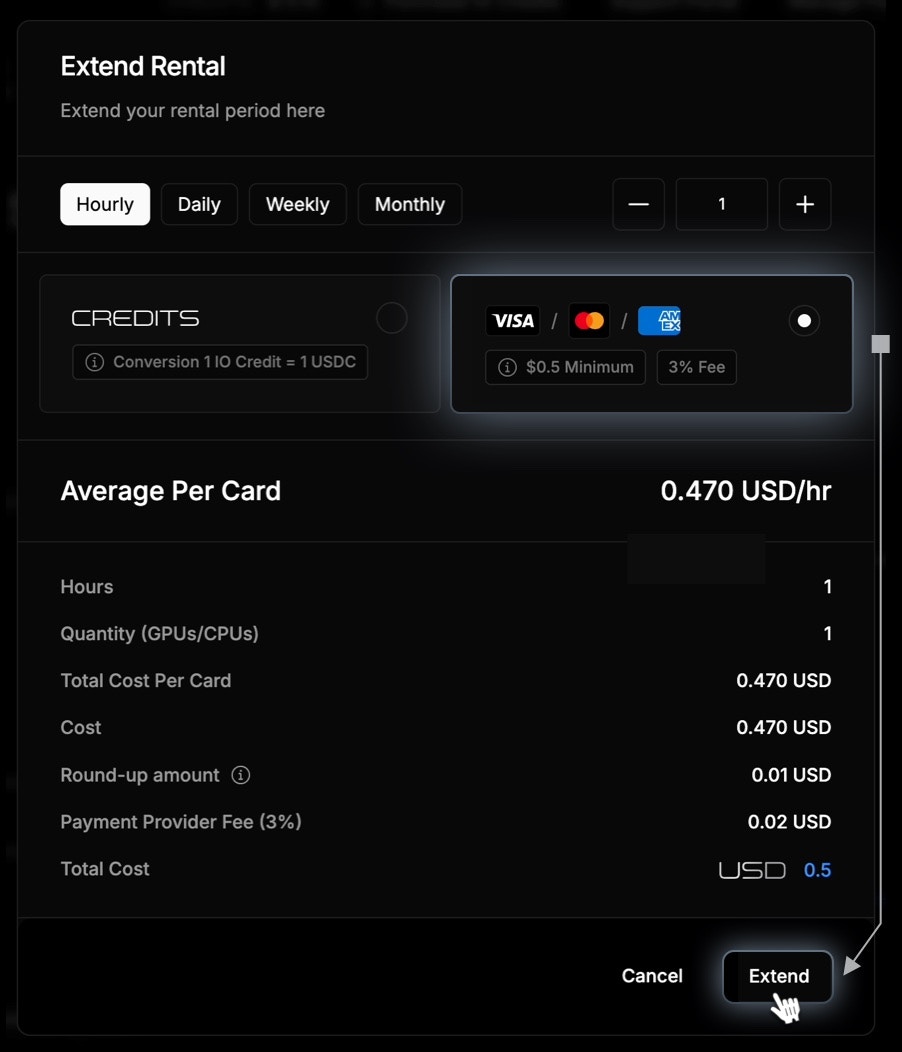 Any leftover amount (after cluster cost + provider fee) is **automatically added to IO Credits.**
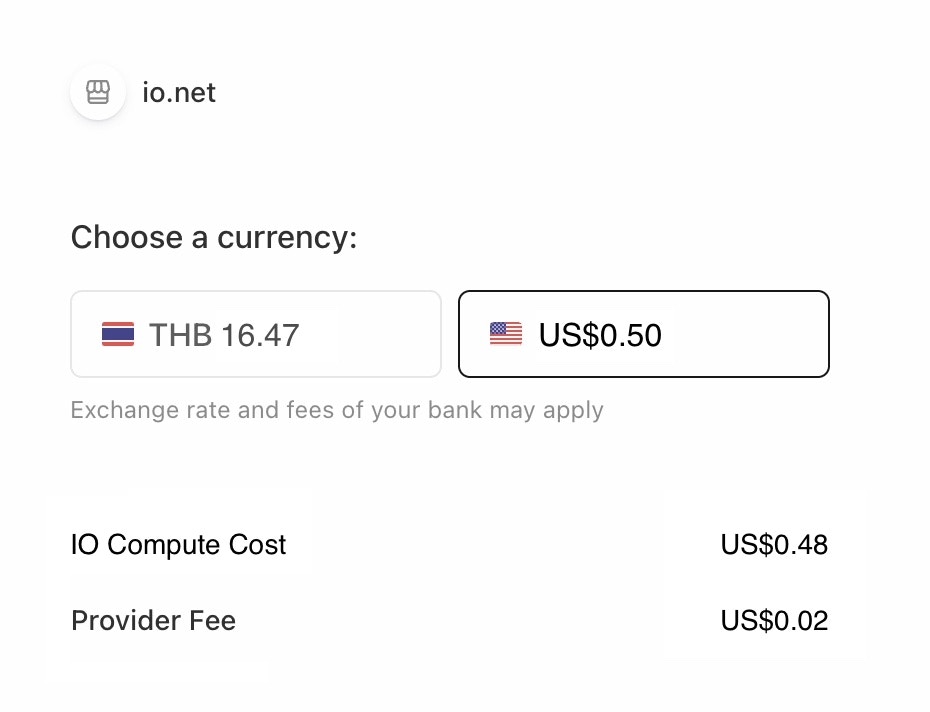 ### Q. How are fees displayed during payment?
When paying through Stripe, you will see:
* **IO Credits Cost / Compute Cost**
* **Payment Provider Fee**
* **Total Amount**
This breakdown makes the payment fully transparent.
### Q. Can I pay with my local currency?
Yes. If your local currency is supported by Stripe, you should be able to pay using it.
Stripe will automatically handle currency conversion to USD during checkout.
The final amount charged may vary slightly based on exchange rates and your bank’s conversion fees.
### Q. Why am I purchasing credits when I pay by card?
Even when you pay directly by card (Fiat), the system works by first adding the equivalent amount as **IO Credits** to your account and then using those credits to pay for your compute clusters.
This happens automatically in the background, so you might see a small remaining balance added as credits if the cluster cost is less than the minimum card payment amount.
### Q. How are fees displayed during payment?
When paying through Stripe, you will see:
* **IO Credits Cost / Compute Cost**
* **Payment Provider Fee**
* **Total Amount**
This breakdown makes the payment fully transparent.
### Q. Can I pay with my local currency?
Yes. If your local currency is supported by Stripe, you should be able to pay using it.
Stripe will automatically handle currency conversion to USD during checkout.
The final amount charged may vary slightly based on exchange rates and your bank’s conversion fees.
### Q. Why am I purchasing credits when I pay by card?
Even when you pay directly by card (Fiat), the system works by first adding the equivalent amount as **IO Credits** to your account and then using those credits to pay for your compute clusters.
This happens automatically in the background, so you might see a small remaining balance added as credits if the cluster cost is less than the minimum card payment amount.