> ## Documentation Index
> Fetch the complete documentation index at: https://io.net/docs/llms.txt
> Use this file to discover all available pages before exploring further.
# IO Credits
> Simplify your io.net Cloud payments with IO Credits, a prepaid USD-equivalent credit system you can use across compute products.
## What are IO Credits?
**IO Credits** are prepaid credits you can use to pay for compute deployments on io.net Cloud, including Ray Clusters, VMs, Kubernetes, and Baremetal. **Each IO Credit is equivalent to 1 USD**, this allows pricing to be simple and consistent.
## Why IO Credits?
* Pay once to use anytime.
* Can be used across [io.net](http://io.net) Cloud products.
* Faster checkout process during deployments.
* Refunds and incentives automatically appear as credits.
* API support is available for fully automated workflows.
## Quick Start
1. On the *Navigation Bar*, click **Buy IO Credits** and A pop-up window will appear.

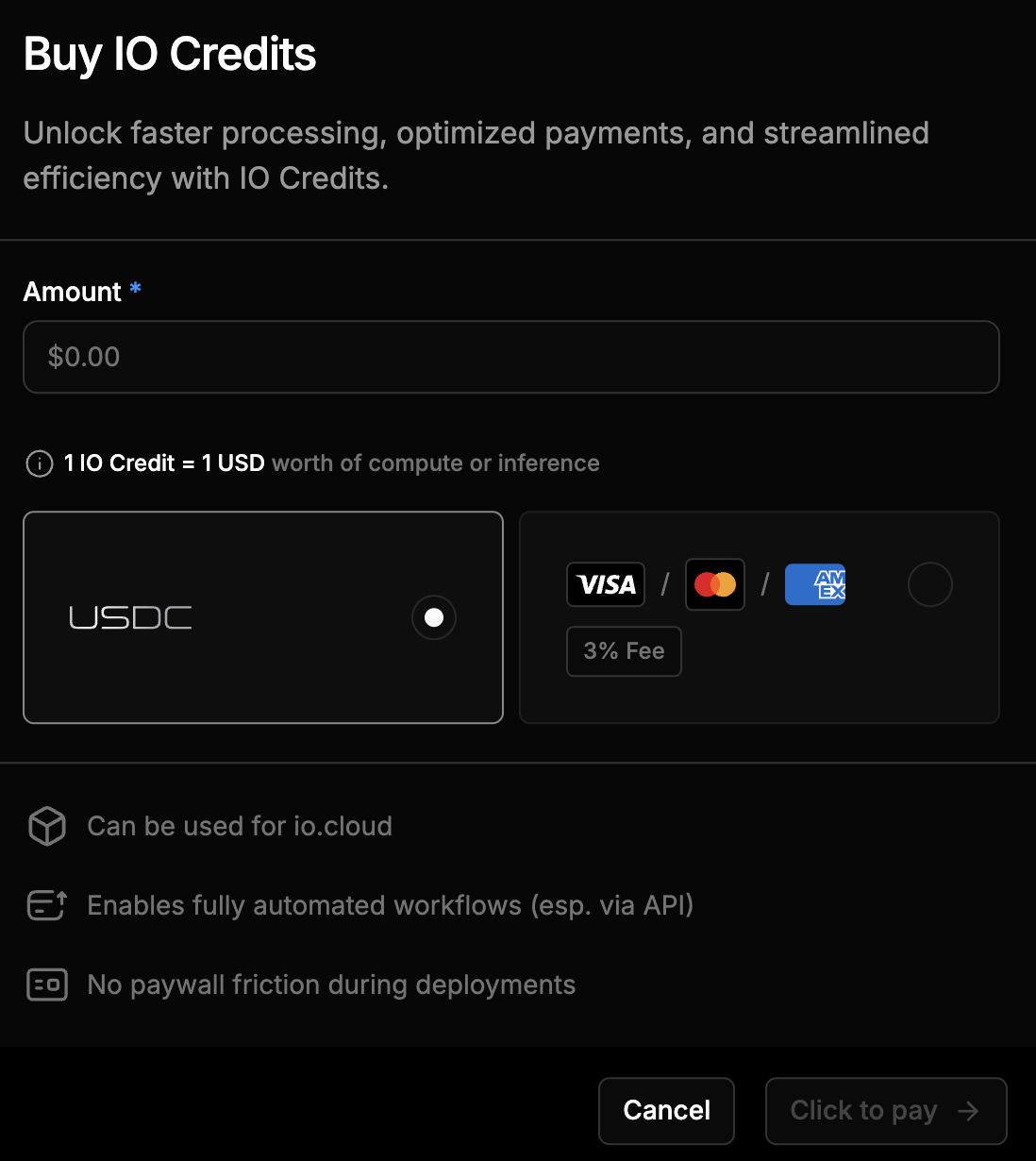 2. Enter the amount of credits you want to purchase.
3. Choose a payment method: **USDC** or **USD (Credit/Debit Card)**.
4. If **USDC** is selected, you will be redirected to **Spherepay** to complete the transaction.
5. If **USD (Credit/Debit Card)** is selected, you will be redirected to **Stripe** to complete the transaction.
6. Once payment is confirmed, the purchased IO Credits will be added to your account.
7. Use IO Credits to deploy compute or inference workloads.
8. View your balance, track usage, and manage withdrawals in **Usage & Billing**.
### Refunds as Credits
If a deployment ends early or is cancelled, any unused funds are returned as IO Credits. You will be notified via the **Notification Center**.
## Using IO Credits
### Compute Products
During the checkout process, several payment options are available.\
Select **IO Credits** to view the required amount and your current credit balance.
1 IO Credit = 1 USD
If sufficient credits are available, the **Pay & Deploy** button becomes active, allowing you to proceed with deployment.
### Use via API
Deployment endpoints accept the parameter `payment_method: "credits"`.\
If the available balance is low, the system may provide fallback options such as:
* `GET /credits/check?amount=XX` – Checks if sufficient credits are available for a specific amount.
* **Pending Payment** state – Indicates that payment confirmation is required.
* **Small negative credit allowance** (for example, up to -\$10) – Allows limited temporary usage.
* **Five-minute grace window** – Prompts you to top up before deployment fails.
* **Failure to deploy** – Occurs if credits are not replenished within the grace period.
## Managing IO Credits
### Viewing Credit Balance
To view your IO Credit balance:
1. Navigate to **Usage & Billing** from the top navigation bar.
2. In this page you can:
* View your **Total IO Credits** displayed as a single balance (in USD).
* View your **Credits Usage** and **Transactions**.
* Request a **Withdrawal** (available for purchased credits only).
### Request Withdrawal
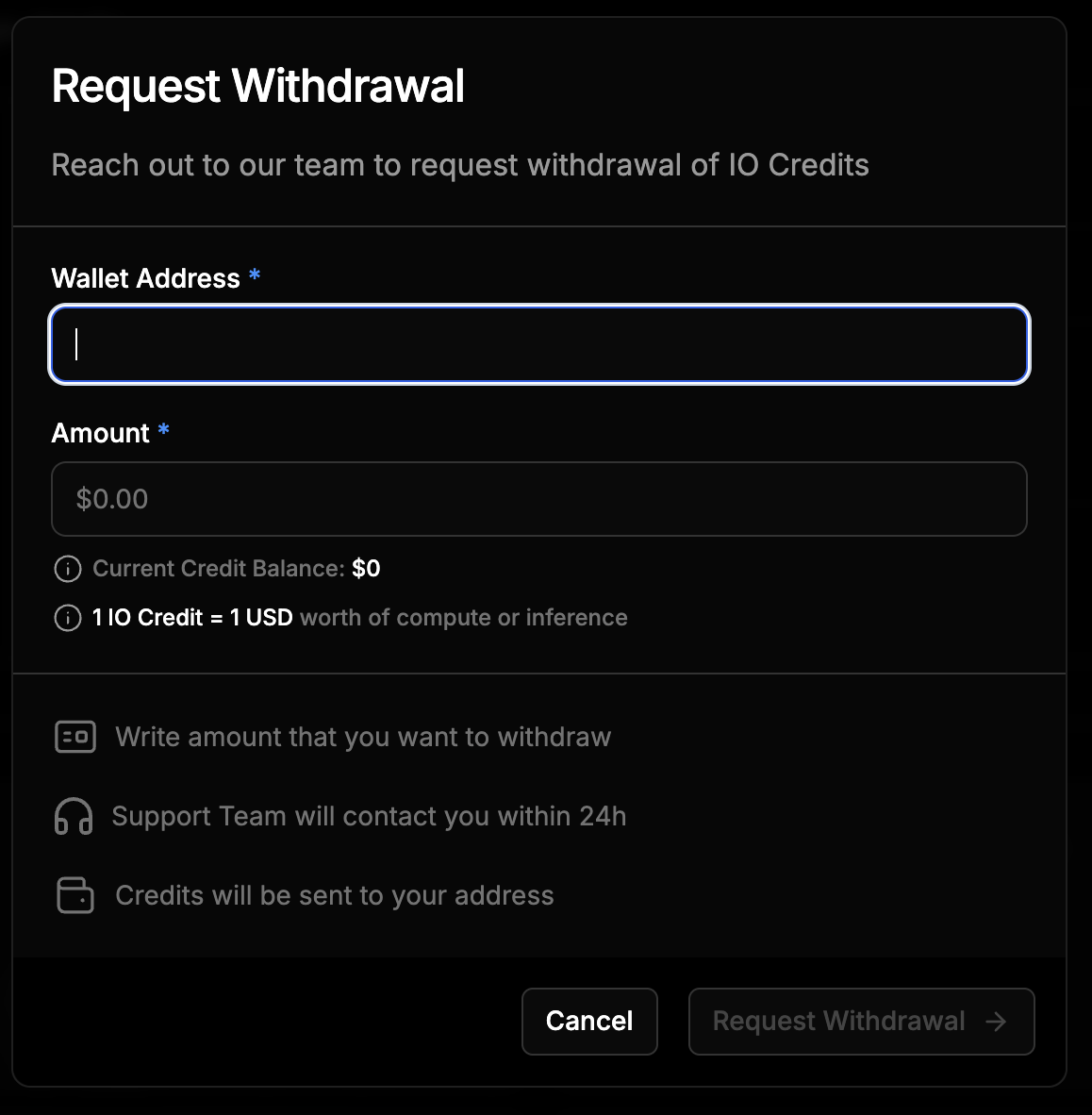
You may submit a manual request to withdraw available **purchased credits** from your balance.
Withdrawals are available only to users who have **paid for credits**. Once submitted, withdrawal requests are reviewed by the IO Finance team and typically **processed within three to seven business days**.
2. Enter the amount of credits you want to purchase.
3. Choose a payment method: **USDC** or **USD (Credit/Debit Card)**.
4. If **USDC** is selected, you will be redirected to **Spherepay** to complete the transaction.
5. If **USD (Credit/Debit Card)** is selected, you will be redirected to **Stripe** to complete the transaction.
6. Once payment is confirmed, the purchased IO Credits will be added to your account.
7. Use IO Credits to deploy compute or inference workloads.
8. View your balance, track usage, and manage withdrawals in **Usage & Billing**.
### Refunds as Credits
If a deployment ends early or is cancelled, any unused funds are returned as IO Credits. You will be notified via the **Notification Center**.
## Using IO Credits
### Compute Products
During the checkout process, several payment options are available.\
Select **IO Credits** to view the required amount and your current credit balance.
1 IO Credit = 1 USD
If sufficient credits are available, the **Pay & Deploy** button becomes active, allowing you to proceed with deployment.
### Use via API
Deployment endpoints accept the parameter `payment_method: "credits"`.\
If the available balance is low, the system may provide fallback options such as:
* `GET /credits/check?amount=XX` – Checks if sufficient credits are available for a specific amount.
* **Pending Payment** state – Indicates that payment confirmation is required.
* **Small negative credit allowance** (for example, up to -\$10) – Allows limited temporary usage.
* **Five-minute grace window** – Prompts you to top up before deployment fails.
* **Failure to deploy** – Occurs if credits are not replenished within the grace period.
## Managing IO Credits
### Viewing Credit Balance
To view your IO Credit balance:
1. Navigate to **Usage & Billing** from the top navigation bar.
2. In this page you can:
* View your **Total IO Credits** displayed as a single balance (in USD).
* View your **Credits Usage** and **Transactions**.
* Request a **Withdrawal** (available for purchased credits only).
### Request Withdrawal
You may submit a manual request to withdraw available **purchased credits** from your balance.
Withdrawals are available only to users who have **paid for credits**. Once submitted, withdrawal requests are reviewed by the IO Finance team and typically **processed within three to seven business days**.
 #### Viewing Transactions
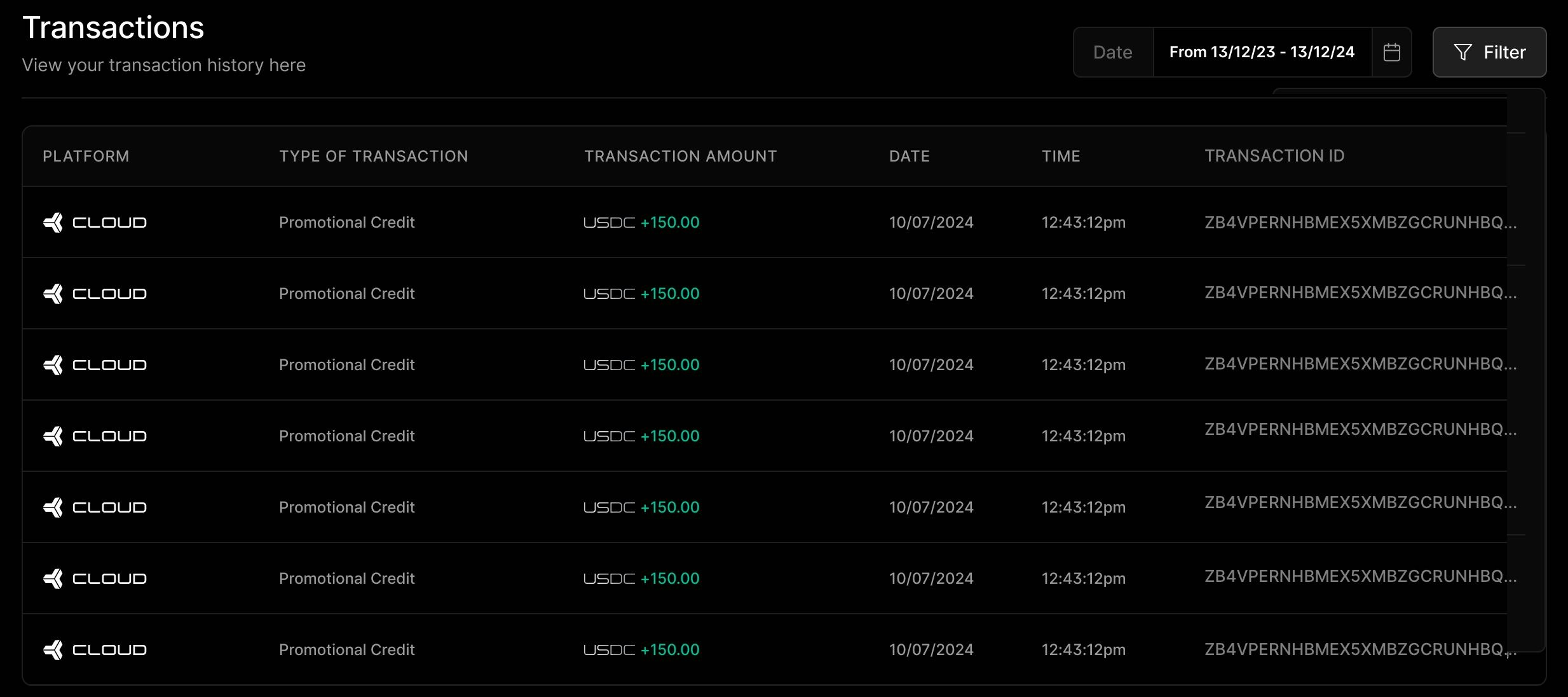
The **Transactions** section provides visibility into how your IO Credits have been **added, used, or refunded**. It allows you to track spending, reconcile deployments, and understand your current balance.
You will find transaction entries for the following categories:
* **Credit Inflow** – Credits that you have purchased or that have been issued to your account by the IO team.
* **Usage Deductions** – Credits spent on compute deployments, inference runs, or other billable operations.
* **Refunds** – Credits returned from early terminations, failed deployments, or unused services.
Each transaction record includes the following details:
* **Type** of transaction
* **Amount** added or deducted
* **Date and time** of the transaction
* **Transaction ID**
Use this log to **audit your activity**, **track usage patterns**, or **troubleshoot billing inquiries**.
#### Viewing Transactions
The **Transactions** section provides visibility into how your IO Credits have been **added, used, or refunded**. It allows you to track spending, reconcile deployments, and understand your current balance.
You will find transaction entries for the following categories:
* **Credit Inflow** – Credits that you have purchased or that have been issued to your account by the IO team.
* **Usage Deductions** – Credits spent on compute deployments, inference runs, or other billable operations.
* **Refunds** – Credits returned from early terminations, failed deployments, or unused services.
Each transaction record includes the following details:
* **Type** of transaction
* **Amount** added or deducted
* **Date and time** of the transaction
* **Transaction ID**
Use this log to **audit your activity**, **track usage patterns**, or **troubleshoot billing inquiries**.
 ## Credit Usage via API and Tracking
Credits are tied to your IO ID and can be used across all io.net Cloud products. When using io.net APIs, you can specify the payment method as `credits` to automatically deduct from your balance.
## FAQs
You will be prompted to top up or use another payment method. Your deployment will pause temporarily and may fail if not resolved in time.
Only **purchased** credits may be withdrawn, after a manual review by the finance team.
Yes. All **purchased** IO Credits expire **twelve (12) months from the date of purchase**.
Once IO Credits expire, any unused balance will **have no remaining value** and **cannot be withdrawn, refunded, or reinstated**.
No. The **12-month expiration** applies **only to non-promotional credits**, which are credits that were **purchased or paid for by users**.
Promotional credits (for example, credits granted by the IO team for trials, rewards, or campaigns) may have **different expiration timelines or conditions**, which will be **clearly stated** when they are issued.
No. Once IO Credits have expired, they **cannot be reactivated** or extended. To continue using IO, you can purchase new credits at any time.
## Credit Usage via API and Tracking
Credits are tied to your IO ID and can be used across all io.net Cloud products. When using io.net APIs, you can specify the payment method as `credits` to automatically deduct from your balance.
## FAQs
You will be prompted to top up or use another payment method. Your deployment will pause temporarily and may fail if not resolved in time.
Only **purchased** credits may be withdrawn, after a manual review by the finance team.
Yes. All **purchased** IO Credits expire **twelve (12) months from the date of purchase**.
Once IO Credits expire, any unused balance will **have no remaining value** and **cannot be withdrawn, refunded, or reinstated**.
No. The **12-month expiration** applies **only to non-promotional credits**, which are credits that were **purchased or paid for by users**.
Promotional credits (for example, credits granted by the IO team for trials, rewards, or campaigns) may have **different expiration timelines or conditions**, which will be **clearly stated** when they are issued.
No. Once IO Credits have expired, they **cannot be reactivated** or extended. To continue using IO, you can purchase new credits at any time.