> ## Documentation Index
> Fetch the complete documentation index at: https://io.net/docs/llms.txt
> Use this file to discover all available pages before exploring further.
# Waiting for IO Containers to Start
> On Linux the above issue can be due to several reasons:
1. **Nvidia-container-toolkit.** Ensure the Nvidia-container-toolkit is installed and properly configured.
2. **Docker Daemon.** Check if Docker Daemon is running.
3. **GPU Configuration.** Docker needs to be configured with the Nvidia runtime to use the GPU inside a container. This can be fixed by installing and configuring the Nvidia-container-toolkit.
#### Debugging:
1. **Test GPU with Docker:** Run the following command to check if Docker can access the GPU:
```
docker run --gpus all nvidia/cuda:11.0.3-base-ubuntu18.04 nvidia-smi
```
If **nvidia-smi** output is visible, Docker can use the GPU inside the container. If not, try restarting Docker Daemon:
```
sudo systemctl restart docker
```
Else there might be some error similar to the following:
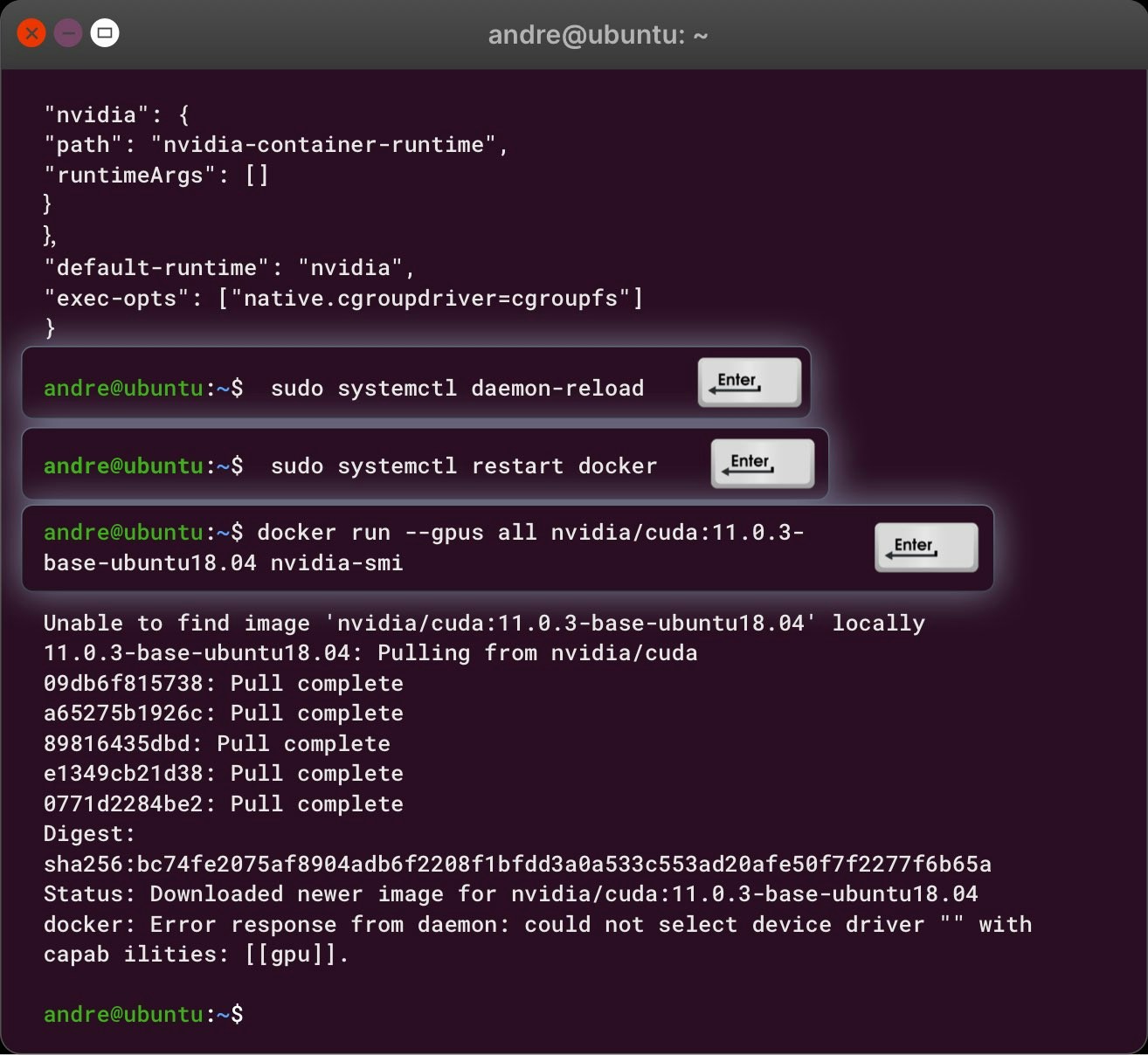 2. **Error Debugging:** If errors related to **nvidia-container-toolkit** are shown, it may not be installed or configured correctly.
#### Commands to Check Nvidia-container-toolkit Installation:
1. Check if Nvidia-container-toolkit is installed:
```
nvidia-container-runtime --version
dpkg -l | grep nvidia-container-toolkit
```
2. If it's installed but not configured properly, follow one of the two methods below:
#### Method 1: Configure daemon.json:
1. Open the daemon.json file:
```
sudo nano /etc/docker/daemon.json
```
2. Paste the following:
```
{
"runtimes": {
"nvidia": {
"path": "nvidia-container-runtime",
"runtimeArgs": []
}
},
"default-runtime": "nvidia"
}
```
3. Save and exit, then reboot the server:
```
sudo reboot
```
4. After reboot, restart Docker:
```
sudo systemctl restart docker
```
#### Method 2: Configure Nvidia-ctk Directly:
Run the following commands:
```
sudo nvidia-ctk runtime configure --runtime=docker
sudo systemctl restart docker
```
#### If Nvidia-container-toolkit is Not Installed:
1. Install Nvidia-container-toolkit:
```
curl -fsSL https://nvidia.github.io/libnvidia-container/gpgkey | sudo gpg --dearmor -o /usr/share/keyrings/nvidia-container-toolkit-keyring.gpg && /
curl -s -L https://nvidia.github.io/libnvidia-container/stable/deb/nvidia-container-toolkit.list | /
sed 's#deb https://#deb [signed-by=/usr/share/keyrings/nvidia-container-toolkit-keyring.gpg] https://#g' | /
sudo tee /etc/apt/sources.list.d/nvidia-container-toolkit.list
```
2. Enable experimental features:
```
sudo sed -i -e '/experimental/ s/^#//g' /etc/apt/sources.list.d/nvidia-container-toolkit.list
```
3. Update and install the toolkit:
```
sudo apt-get update
sudo apt-get install -y nvidia-container-toolkit
sudo nvidia-ctk runtime configure --runtime=docker
sudo systemctl restart docker
```
#### Verify Nvidia-container-toolkit:
1. Check if the toolkit is in the **\$PATH**:
```
/usr/bin/nvidia-ctk --version
echo $PATH
```
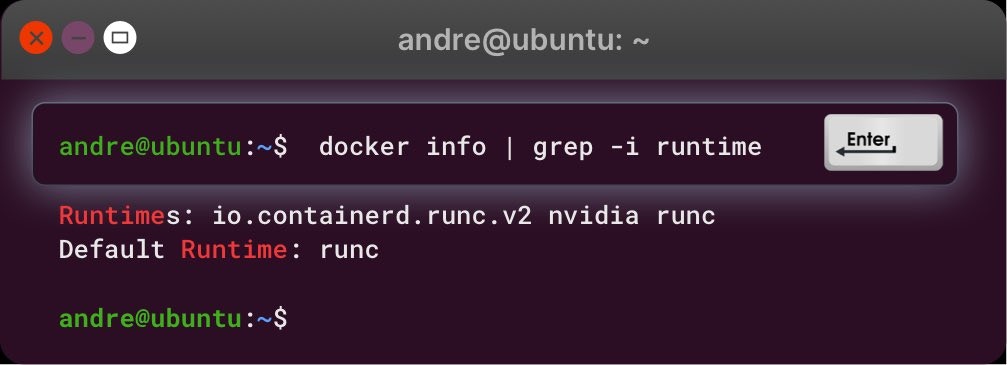
2. Verify the runtime is configured:
```
docker info | grep -i runtime
```
Sample output:
2. **Error Debugging:** If errors related to **nvidia-container-toolkit** are shown, it may not be installed or configured correctly.
#### Commands to Check Nvidia-container-toolkit Installation:
1. Check if Nvidia-container-toolkit is installed:
```
nvidia-container-runtime --version
dpkg -l | grep nvidia-container-toolkit
```
2. If it's installed but not configured properly, follow one of the two methods below:
#### Method 1: Configure daemon.json:
1. Open the daemon.json file:
```
sudo nano /etc/docker/daemon.json
```
2. Paste the following:
```
{
"runtimes": {
"nvidia": {
"path": "nvidia-container-runtime",
"runtimeArgs": []
}
},
"default-runtime": "nvidia"
}
```
3. Save and exit, then reboot the server:
```
sudo reboot
```
4. After reboot, restart Docker:
```
sudo systemctl restart docker
```
#### Method 2: Configure Nvidia-ctk Directly:
Run the following commands:
```
sudo nvidia-ctk runtime configure --runtime=docker
sudo systemctl restart docker
```
#### If Nvidia-container-toolkit is Not Installed:
1. Install Nvidia-container-toolkit:
```
curl -fsSL https://nvidia.github.io/libnvidia-container/gpgkey | sudo gpg --dearmor -o /usr/share/keyrings/nvidia-container-toolkit-keyring.gpg && /
curl -s -L https://nvidia.github.io/libnvidia-container/stable/deb/nvidia-container-toolkit.list | /
sed 's#deb https://#deb [signed-by=/usr/share/keyrings/nvidia-container-toolkit-keyring.gpg] https://#g' | /
sudo tee /etc/apt/sources.list.d/nvidia-container-toolkit.list
```
2. Enable experimental features:
```
sudo sed -i -e '/experimental/ s/^#//g' /etc/apt/sources.list.d/nvidia-container-toolkit.list
```
3. Update and install the toolkit:
```
sudo apt-get update
sudo apt-get install -y nvidia-container-toolkit
sudo nvidia-ctk runtime configure --runtime=docker
sudo systemctl restart docker
```
#### Verify Nvidia-container-toolkit:
1. Check if the toolkit is in the **\$PATH**:
```
/usr/bin/nvidia-ctk --version
echo $PATH
```
2. Verify the runtime is configured:
```
docker info | grep -i runtime
```
Sample output:
 #### Final GPU Test:
Run the following command to test if Docker can use the GPU:
```
docker run --gpus all nvidia/cuda:11.0.3-base-ubuntu18.04 nvidia-smi
```
#### Final GPU Test:
Run the following command to test if Docker can use the GPU:
```
docker run --gpus all nvidia/cuda:11.0.3-base-ubuntu18.04 nvidia-smi
```