> ## Documentation Index
> Fetch the complete documentation index at: https://io.net/docs/llms.txt
> Use this file to discover all available pages before exploring further.
# Getting Started with IO Explorer API
> Use IO Explorer APIs to gain insight into the different elements of our network.
### Authentication
To use io.net APIs, you must supply a *JWT token* in the header of your request.
Follow the instructions below to generate a token:
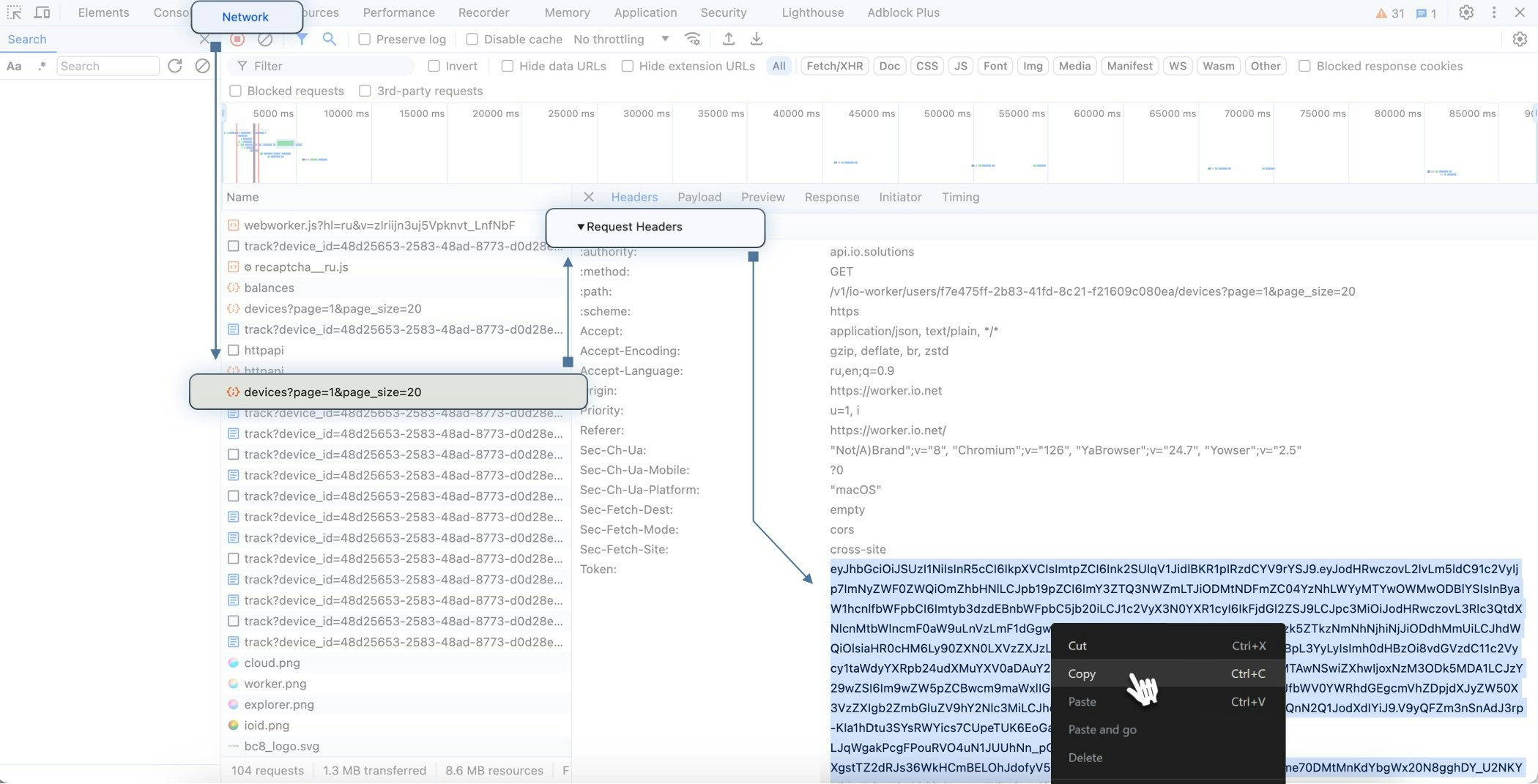
1. Go to io.net > **Get Started** > **IO Explore** > and the **Workers** tab.
2. In the **UI**, right-click and select **Inspect**.
3. In the **Inspect** tool, click **Network**.
4. Refresh the **Workers** page.
5. In the list of elements, click **Devices**.
6. Scroll down to the **Request Headers** section.
7. Copy and store the token.
The token is valid for 21 days.
### Make an API Call
You can use **cURL** to make API requests. Make sure you replace the following variables:
* `{device_id}`: Your actual **Device ID**, which you can copy from the *Device View* page.
* `{your_token}` : The **Token** you previously copied using the **Inspect Tool**.
```bash theme={null}
curl X GET "https://api.io.solutions/v1/io-explorer/devices/{device_id}/details"
-H "Token: {your_token}"
```
### Rate Limits
The base io.net API rate limit is as follows:
* 150 reqs / 10 second (umbrella Rate Limit on IO Explorer)
* **Summary:** 100 / 5 minutes
* **Details:** 100 / 5 minutes
* **Search:** 80 / 1 minute
 ### Make an API Call
You can use **cURL** to make API requests. Make sure you replace the following variables:
* `{device_id}`: Your actual **Device ID**, which you can copy from the *Device View* page.
### Make an API Call
You can use **cURL** to make API requests. Make sure you replace the following variables:
* `{device_id}`: Your actual **Device ID**, which you can copy from the *Device View* page.
 * `{your_token}` : The **Token** you previously copied using the **Inspect Tool**.
```bash theme={null}
curl X GET "https://api.io.solutions/v1/io-explorer/devices/{device_id}/details"
-H "Token: {your_token}"
```
### Rate Limits
The base io.net API rate limit is as follows:
* 150 reqs / 10 second (umbrella Rate Limit on IO Explorer)
* **Summary:** 100 / 5 minutes
* **Details:** 100 / 5 minutes
* **Search:** 80 / 1 minute
* `{your_token}` : The **Token** you previously copied using the **Inspect Tool**.
```bash theme={null}
curl X GET "https://api.io.solutions/v1/io-explorer/devices/{device_id}/details"
-H "Token: {your_token}"
```
### Rate Limits
The base io.net API rate limit is as follows:
* 150 reqs / 10 second (umbrella Rate Limit on IO Explorer)
* **Summary:** 100 / 5 minutes
* **Details:** 100 / 5 minutes
* **Search:** 80 / 1 minute