

Why On-Chain?
Moving transactions to the Solana blockchain ensures:- Transparency — Every payment, refund, or repurchase can be independently verified.
- Security — Funds are held in escrow using smart contracts, reducing risk.
- Efficiency — Automated payments and settlements minimize delays and errors.
- Decentralization — All financial flows are publicly auditable and blockchain-native.
- Ecosystem Support — A portion of every transaction goes toward repurchasing $IO on the open market, supporting liquidity and value for token holders.
Total Network Earnings and Daily Network Earnings reflect estimated values based on compute provided, not actual payments or finalized settlements.
Clusters initiated in USDC can have remaining balances settled in IO Coin or USD, enabling flexible multi-currency transactions.
How It Works
The Epochs tab gives you full visibility into the financial activity happening across the io.net network. This section of IO Explorer is designed to highlight revenue trends, individual transaction details, and the overall performance of the platform in real time.
Total Network Earnings
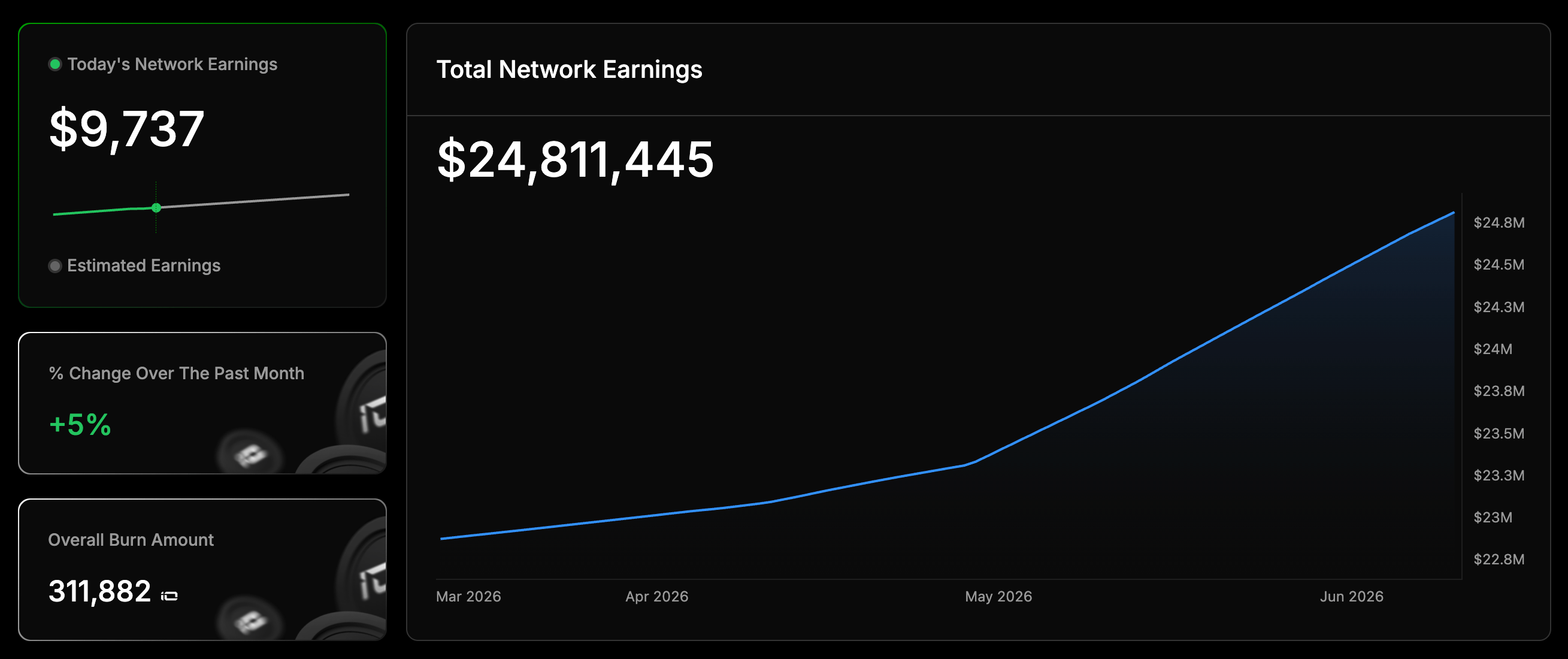
This block provides a comprehensive overview of all revenue generated across the network. It includes:- Total Earnings Graph: A line graph displaying estimated cumulative revenue over time.
- Daily Change (%): A quick view of the day-over-day percentage change in revenue, giving users an immediate sense of growth or fluctuation.
- Detailed Revenue Graph: A more granular visualization that breaks down network earnings into smaller time intervals or sources for deeper analysis.
All compute workloads are denominated and recorded in IO Coin terms, even when the initial cluster payment was made in another currency.
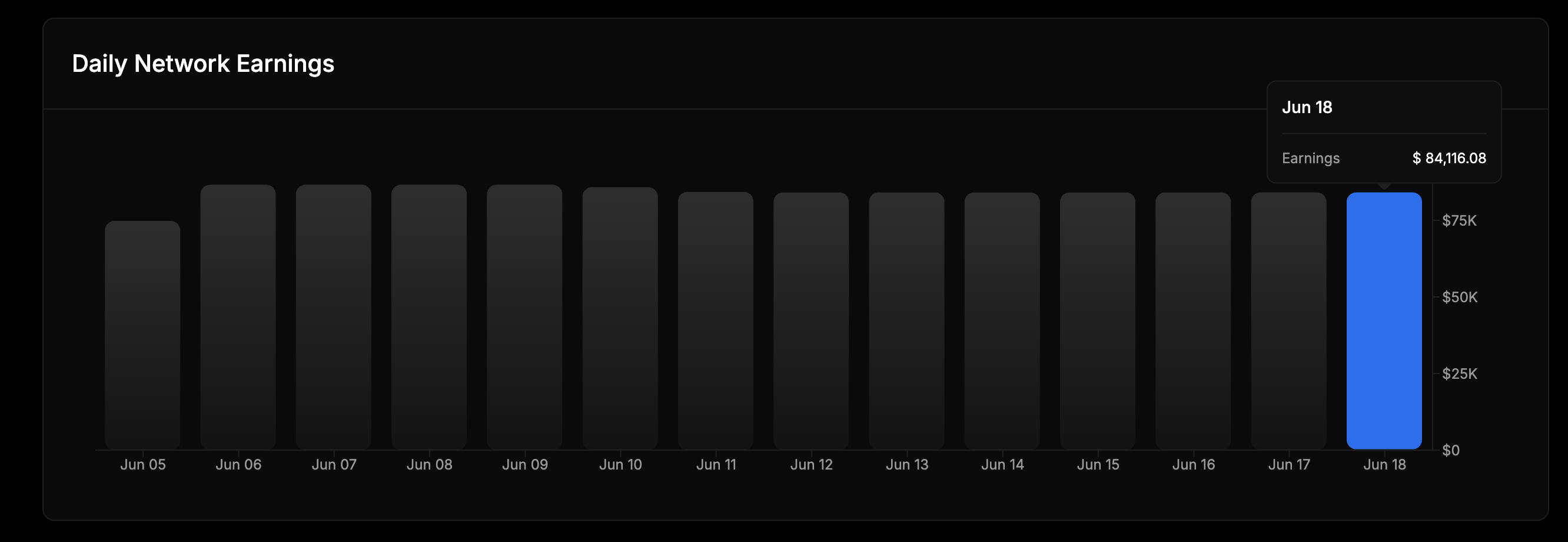
Daily Earnings Trends
This section highlights how earnings change over time, using a Bar Chart by Day to show daily revenue. It helps you spot trends, seasonal patterns, and the effects of key events or cluster deployments.Within TNE metadata, all transaction values are displayed in USDC for clarity and consistency.
Monthly Network Earnings Trends
This section highlights how earnings change over time, using a Line Chart by Month to show monthly earnings.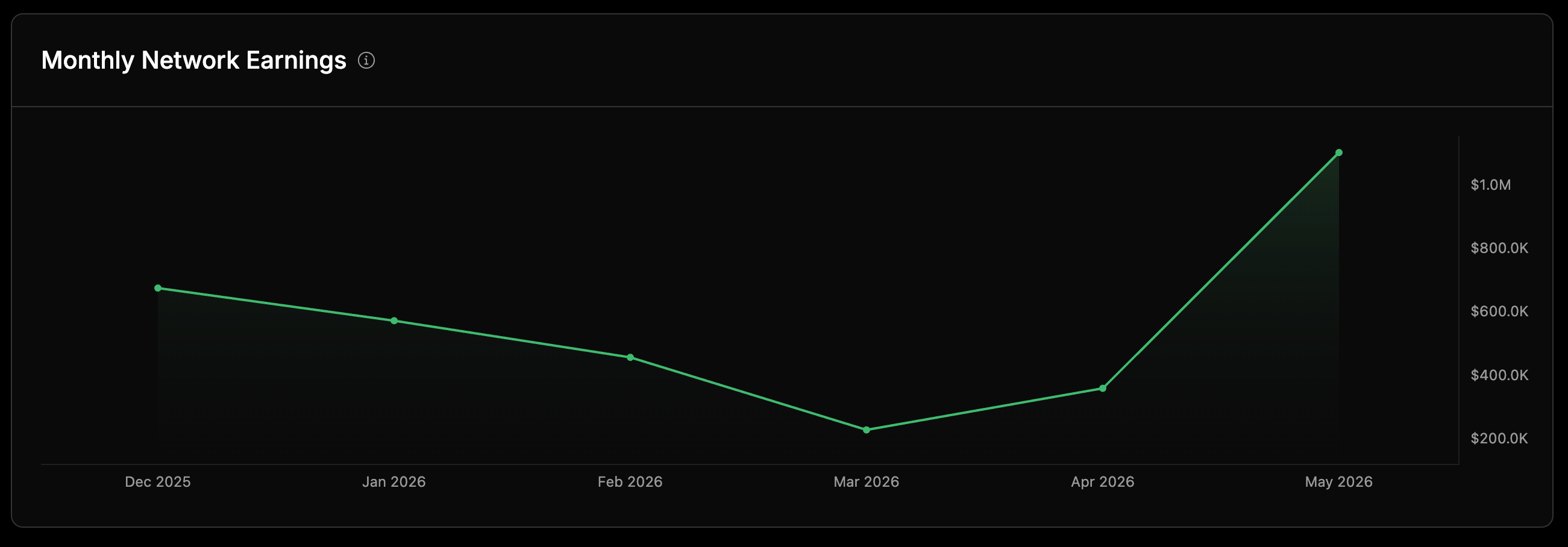
Epoch List
The Epoch Rewards Dashboard provides visibility into epoch-level reward distribution, token purchases, and burn activity across the network. It enables administrators to track historical reward calculations, validate reward signatures, and monitor supplier participation over time. The dashboard is divided into three primary sections:- Filter Controls: Narrow down results by date range, supplier, client, or epoch status.
- Summary Metrics: High-level statistics for the selected time period.
- Epoch List: Detailed epoch-by-epoch breakdown of rewards and burn calculations.
Filter Controls
The dashboard supports the following filters:Summary Metrics
The summary section provides aggregated statistics for the selected dataset.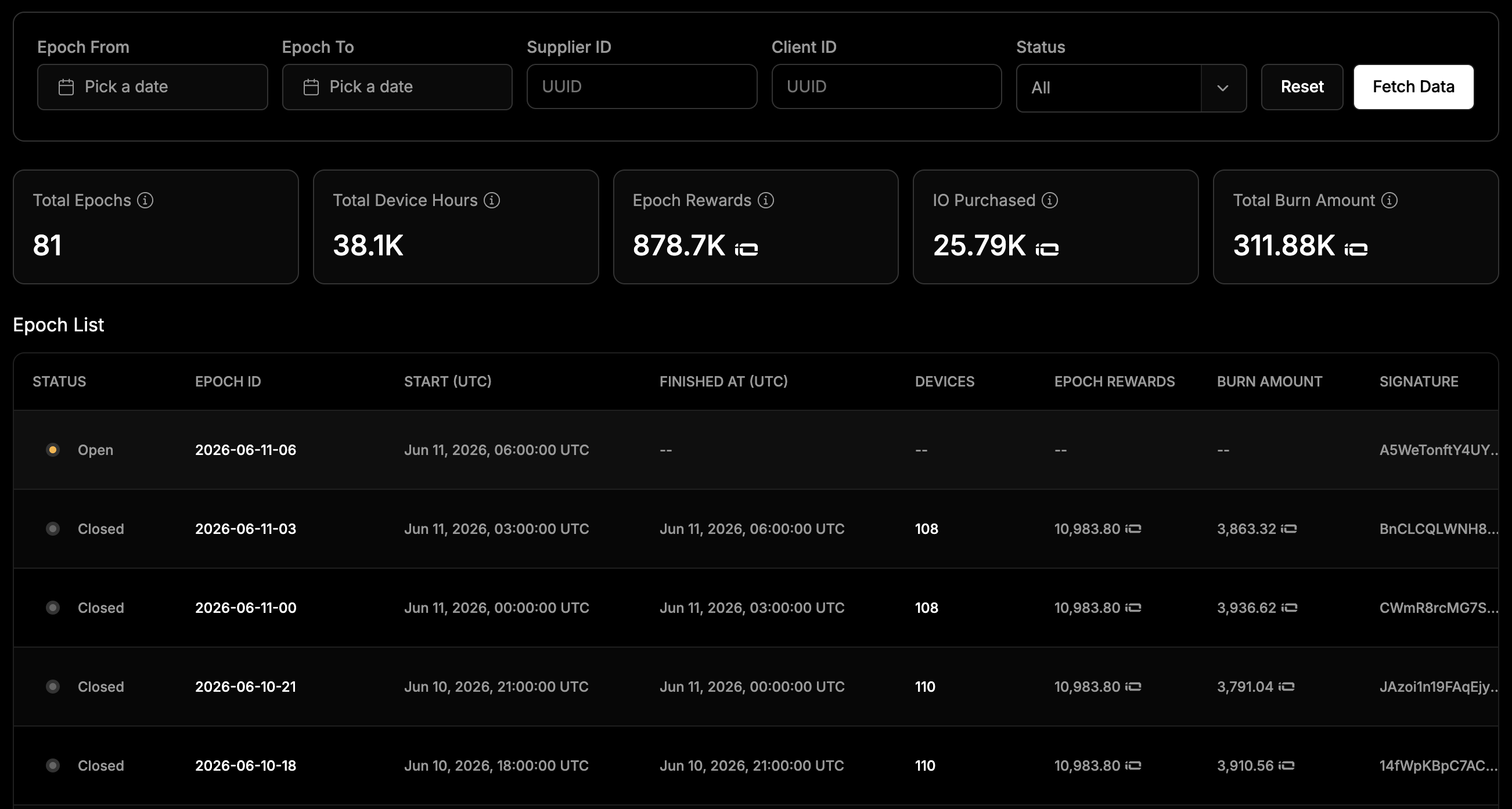
When no $IO repurchase is recorded, it indicates that the client paid directly in IO Coin.
Epoch Details
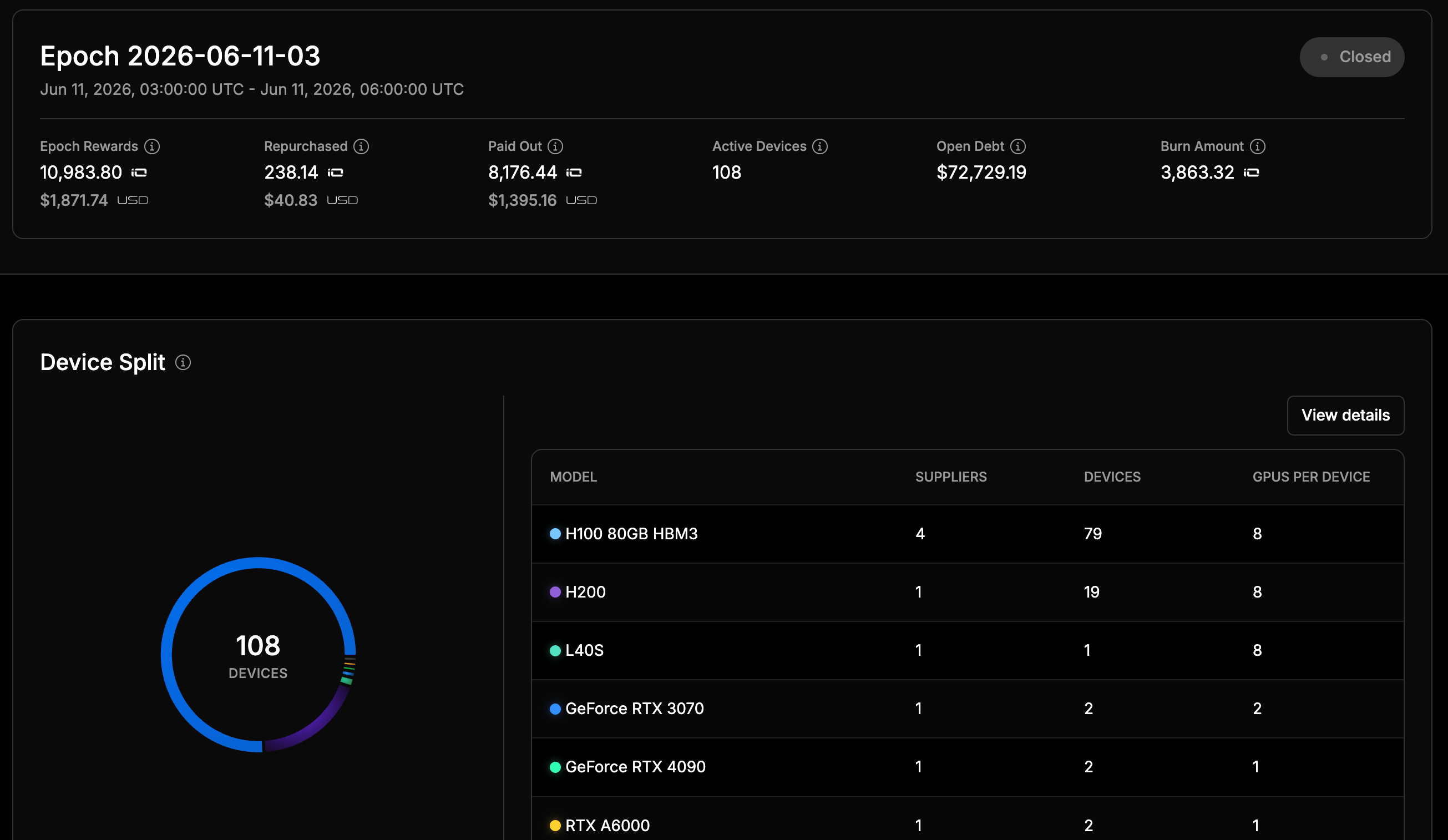
The Epoch Details page provides a comprehensive view of a single epoch, including reward allocation, token repurchases, payouts, burn activity, debt obligations, and participating device inventory. This page is designed to support auditing, reward verification, and infrastructure analytics.Overview
At the top of the page, users can view the selected epoch identifier, its execution window, and current status.Epoch Information
Epoch Metrics
The summary section provides key financial and operational metrics for the selected epoch.- Epoch Rewards: The total amount of IO tokens allocated to suppliers during the epoch based on eligible device participation and reward calculations.
- Repurchased: The amount of IO tokens repurchased during the epoch/
- Paid Out: The total amount of IO tokens distributed to suppliers for the epoch. This value represents finalized supplier earnings that have been allocated for payment.
- Active Devices: The total number of unique devices that participated and qualified for rewards during the epoch.
- Open Debt: The outstanding financial obligation associated with the epoch.
- Burn Amount: The total amount of IO tokens permanently removed from circulation during the epoch.
Quick Steps for Users
- Connect your Solana-compatible wallet (e.g., Phantom, Solflare) to seamlessly track your earnings and transactions on-chain.
- Use the Explorer’s Epochs tab to view detailed, real-time payment and payout information.