

Getting Started
Step 1: Select a Secure Model
- Navigate to ai.io.net/ai/models
- Look for models with the SECURE AI badge
- Click on a secure model to start a confidential chat session

Step 2: Start Chatting Privately
Once you select a secure model, you enter a private chat session with the following guarantees:- Messages are never saved - your conversation is not stored on any server
- No observation - io.net staff cannot see your prompts or responses
- Session-only context - only the current chat is passed to the LLM for context
- End-to-end verification - every response is cryptographically signed
Privacy Guarantees
Verifying Attestation and Signatures
Every message in a confidential chat can be verified. Click the Secure AI label under any AI response to open the verification panel.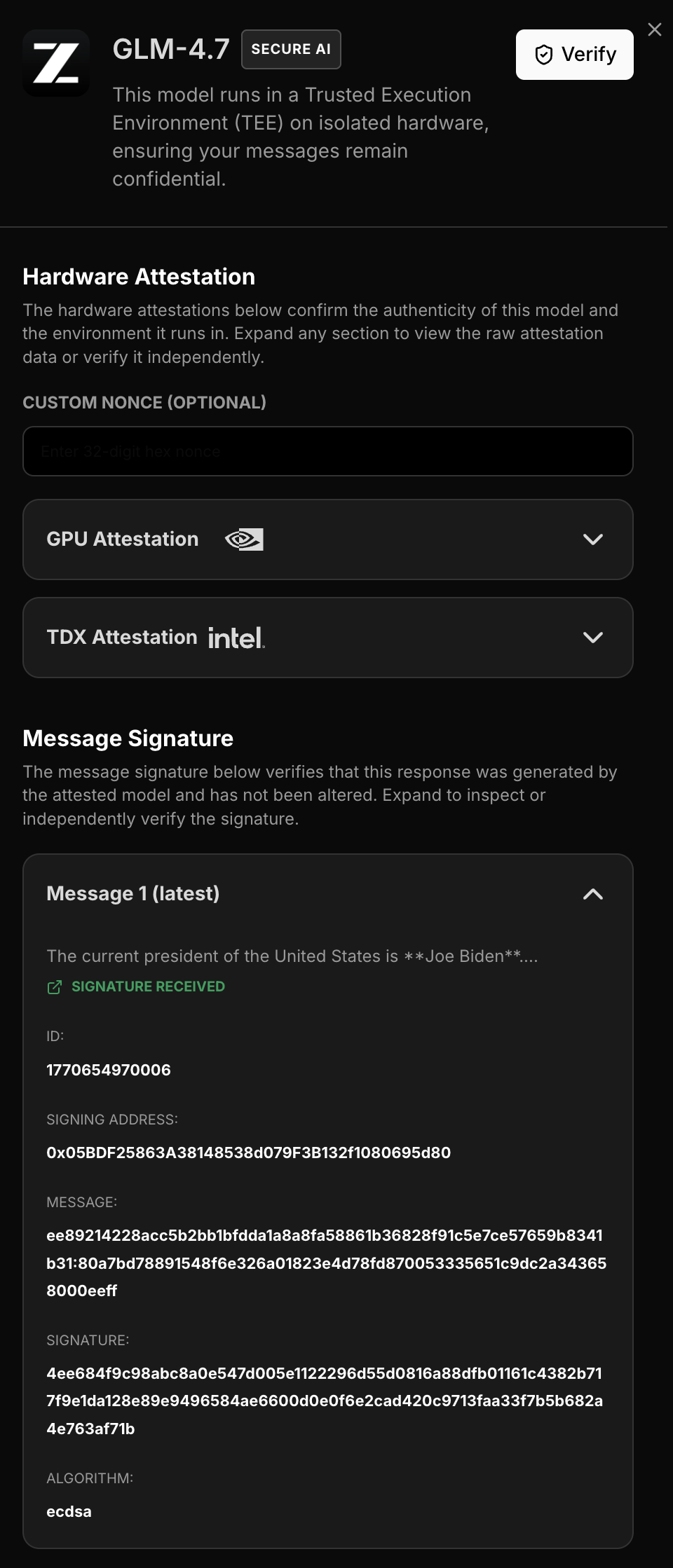
Attestation Report
The verification panel displays the full attestation report, proving:- The response came from a genuine NVIDIA GPU running in TEE mode
- The specific hardware configuration and firmware version
- The container image hash (
image_digest) running inside the secure enclave - compare with the expected digest from the latest official release to confirm the container hasn’t been tampered with
Message Signatures
For each AI response, you can view:
This allows you to independently verify that:
- The response was generated by the attested hardware
- The content was not modified after generation
- The signing key matches the attestation report
Best Practices
For Maximum Privacy
- Start fresh sessions for sensitive topics
- Verify signatures for critical responses
- Check attestation to confirm hardware authenticity
- Clear your browser after sensitive sessions
Understanding Session Context
Since messages are not saved:- The AI only has context from the current session
- New chat starts a new session with no history
- You cannot retrieve previous confidential conversations
What’s Next
- Quick Start API - For developers building integrations
- Verification Guide - Deep dive into verifying attestation and signatures